- Many ranking problems are technical. Google can only rank a page it can crawl, index, and trust.
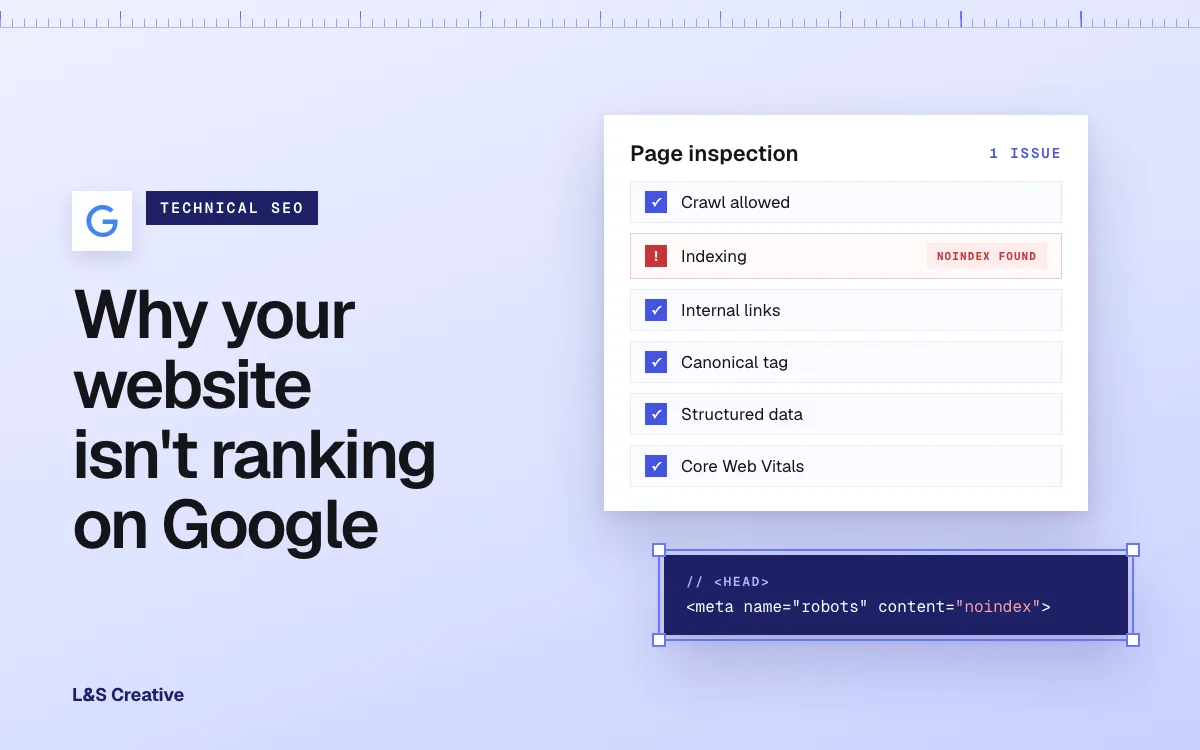
- A single stray noindex tag or a robots.txt disallow line can quietly remove pages from search, and neither shows up unless you check for it directly.
- Missing redirects and lost internal links after a redesign are a common cause of a sudden ranking drop we see. A redirect plan made before launch prevents most of it.
- Google's site-move guide says 301 redirects don't cause a loss in PageRank. When rankings drop after a redesign, something else is usually stacked on top: lost content, broken links, or a slower new site.
- Missing or conflicting canonical tags leave Google guessing which version of a page to rank, and can split your ranking signals across two URLs.
- Core Web Vitals are used by Google's ranking systems, though relevance comes first. A slow or unstable page can hold back an otherwise well-optimized one.
Why isn’t my website ranking on Google?
If your content is solid and you’re still not ranking, or you were ranking and then weren’t, the cause is often technical: something is stopping Google from crawling, indexing, or trusting the page. This is the same checklist we run in our technical SEO work. Here are the causes we check first, in the order we check them.
1. Google can’t crawl the page at all
Before Google can rank anything, it has to be able to fetch it. Check your live robots.txt file directly (yoursite.com/robots.txt) for a blanket Disallow: / or a disallow rule on the specific section that isn’t ranking. This happens more than people expect, especially after a staging site gets pushed to production with its “block all crawlers” robots.txt still attached.
2. A stray noindex tag is telling Google not to index the page
A noindex meta tag or X-Robots-Tag header tells Google flatly: don’t put this page in search results, even if you can crawl it fine. These get left behind all the time. A developer sets noindex on a staging build and forgets to remove it before launch, or a CMS template applies it site-wide by mistake. Check the page’s source or a crawling tool for this tag directly. It’s invisible on the rendered page, which is exactly why it survives so long unnoticed. Google explains how the tag works in its noindex documentation.
3. Your internal links don’t actually point to the page
Google finds most pages by following links from other pages it already knows about. A page with no internal links pointing to it, an “orphan page,” is much harder for Google to find and far less likely to be seen as important, even if it’s technically indexed. This happens after redesigns all the time: a page survives the migration, but the links that used to point to it from your nav or other content never get rebuilt.
4. You have duplicate or conflicting canonical tags
A canonical tag tells Google which URL is the “real” version when the same or similar content exists at more than one address. Google’s guide to canonical URLs describes the point of it: consolidating the signals for duplicate pages into a single, preferred URL. When canonical tags are missing, duplicated incorrectly, or point to the wrong page, Google can end up splitting those signals across two URLs, and may index the version you didn’t want.
5. Something changed in a redesign and nobody tracked it
“We redid our website and rankings dropped” is one of the most common things we hear. Be precise about the cause, because it’s rarely the redesign itself. Google’s site-move guide says plainly that 301 and other permanent redirects don’t cause a loss in PageRank. The same guide warns to expect temporary ranking fluctuation during a move, and says rankings settle down over time. It also says to keep redirects in place for as long as possible, generally at least 1 year.
What actually causes the drop is usually one or more of these, stacked together:
- URLs changed without redirects. The old URL 404s instead of 301-redirecting to its new home, so every backlink and every bit of ranking history pointing at it goes nowhere.
- Content got thinner in the rebuild. A page that ranked for a specific question loses the paragraph that actually answered it during a “simplify the copy” pass.
- Meta titles and descriptions got wiped and replaced with generic template defaults. This alone can tank click-through rate even if rankings hold.
- The new site is measurably slower. A heavier design system or unoptimized images can hurt Core Web Vitals enough to matter (see #7).
Redesigns need a plan: a full URL inventory, a redirect map built before launch, and a post-launch check that every important page still resolves and still ranks. Our website launch checklist covers the pre-launch checks, including 301 redirects. The same discipline drove our Transfrinc migration: 250+ pages moved from WordPress to Webflow with no dip in organic rankings or traffic in the three weeks we monitored after launch. The redirect map and content audit were finished before launch day.
6. Your structured data is missing, broken, or contradicts your page
Schema markup helps Google understand what a page is, beyond the words on it. Broken JSON-LD, syntax errors, or schema that describes something different from what’s actually on the page can cost you rich results. Run any page through Google’s own Rich Results Test before assuming your schema is doing anything for you.
7. Core Web Vitals are dragging the page down
Core Web Vitals measure loading speed, interactivity, and visual stability. Google’s page experience documentation confirms they are used by its ranking systems. The same page is clear that relevance comes first: Google will still show the most relevant content even when its page experience is poor. So treat speed as a tiebreaker between otherwise similar pages. It also shapes whether visitors stay once they land. A well-written page that takes eight seconds to become interactive is working against itself twice: once in ranking, and once with every visitor who leaves before it loads.
Ranking drop: technical cause or something else?
Not every drop is the same kind of problem, and treating a demand shift like a technical bug wastes time.
- Sudden, single-page drop right after a change. Technical. Check the changed page first: redirects, noindex tags, canonical tags, and whether it still has the internal links it used to.
- Gradual decline across many pages, no site change. Often not technical. Look at whether a competitor outranked you with a better answer, or whether demand for the query itself is shifting.
- Drop across your whole category, competitors affected too. Usually an algorithm update or a broad market shift. Your site may have nothing broken at all.
- Drop that lines up exactly with a redesign or migration date. Technical, and usually a missed redirect, lost content, or a slower new build. Start with the redesign checks in #5.
Where to check each of these
A few free and low-cost tools cover this whole list. Our roundup of SEO tools worth using covers the ones we reach for first.
- Crawlability. Fetch yoursite.com/robots.txt directly and read it line by line.
- Indexability. Google Search Console’s URL Inspection tool tells you whether a specific page is indexed and, if not, why.
- Internal links. A crawl tool such as Screaming Frog, run against your sitemap, finds pages with zero internal links pointing at them. Search Console’s Links report shows which pages get the most internal links.
- Canonical tags. View page source and search for
rel="canonical", or check it in the URL Inspection tool. - Redirects after a redesign. Search Console’s Page indexing report (formerly the Coverage report) lists pages returning “Not found (404)”, so a spike there after launch points to old URLs that weren’t redirected.
- Structured data. Google’s Rich Results Test flags syntax errors and missing required fields.
- Core Web Vitals. Google’s PageSpeed Insights and the Core Web Vitals report in Search Console both show field data from real Chrome users when Google has enough of it.
The limits here, honestly
Fixing every item on this list doesn’t guarantee a ranking. Technical SEO removes obstacles. Relevance and authority come from your content and the links you earn. If two pages are both perfectly crawlable, indexable, and fast, the one with the better, more specific answer to the query still wins. Treat this list as the floor. And traffic drops have non-technical causes too: seasonality, a genuine algorithm update affecting your whole category, or a competitor simply publishing something better. Rule out the boring explanations before you assume every drop is a technical bug.
FAQ
Why did my rankings drop after I redesigned my website?
Usually it isn’t the redesign itself. Google’s site-move guide says 301 redirects don’t cause a loss in PageRank. The usual causes are missing redirects on changed URLs, thinner content in the rebuild, wiped meta titles and descriptions, or a slower new site hurting Core Web Vitals.
How do I know if Google can even see my page?
Check your live robots.txt file for a disallow rule, then use Google Search Console’s URL Inspection tool on the specific page. It tells you whether the page is indexed and, if not, why.
What is an orphan page and why does it hurt rankings?
An orphan page is one with no internal links pointing to it from anywhere else on your site. Google finds most pages by following links, so an orphan page is harder to discover and gets treated as less important even when it’s technically indexed.
Do Core Web Vitals really affect rankings?
Yes. Google says Core Web Vitals are used by its ranking systems, but relevance comes first. They matter most as a tiebreaker between pages that are otherwise similarly relevant.
How long should I keep a 301 redirect after a URL changes?
Google’s site-move guide says to keep redirects for as long as possible, generally at least 1 year. The safest plan is to keep the same URLs wherever you can, so fewer redirects are needed in the first place.
Does a noindex tag stop Google from crawling my page?
No. Crawling and indexing are separate steps. A noindex tag only blocks the second one: Google can still crawl the page, but it will leave the page out of search results. Google also has to be able to crawl the page to see the tag, so don’t block it in robots.txt as well.
Ready when you are
Not sure which of these is holding your site back? Book a Strategy Call and we’ll look at your actual site together. Read more about our SEO service, how we run SEO, AEO, and CRO as one system, or see our website launch checklist if you’re planning a redesign and want to protect your rankings before you start.