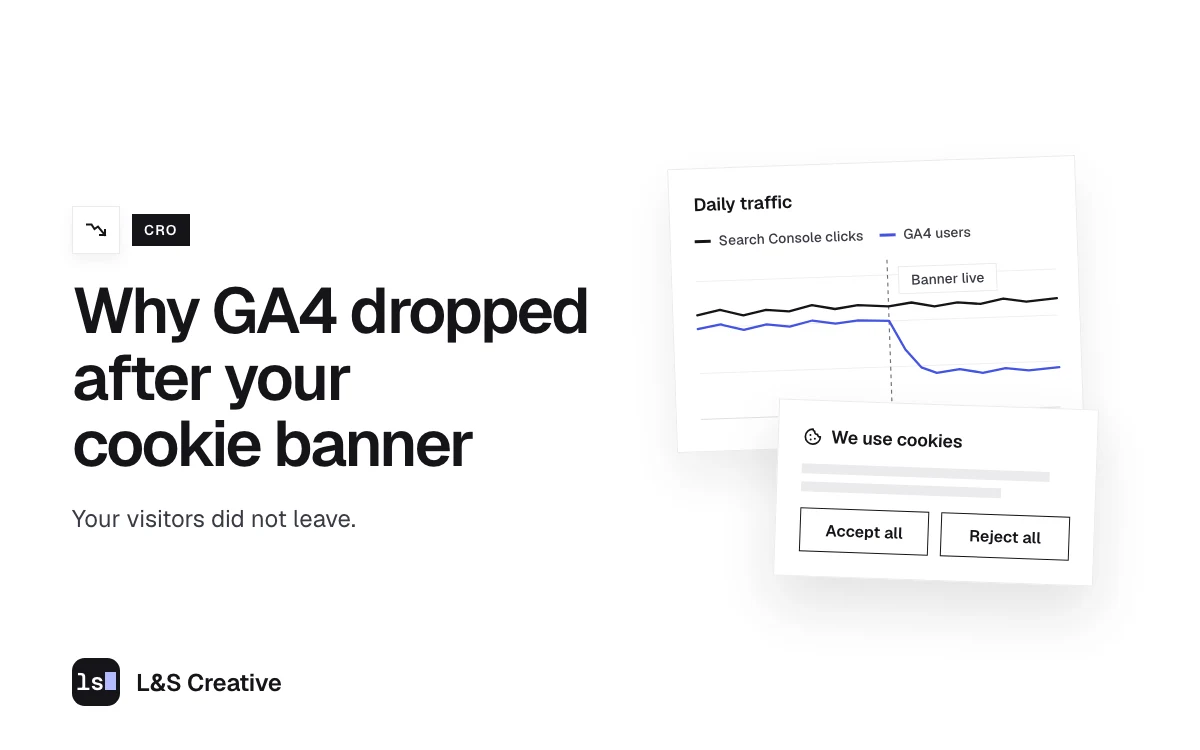
- A GA4 drop after a cookie banner usually means fewer people are being counted. Visitors keep arriving. Analytics just is not allowed to count the ones who decline or ignore the banner.
- Search Console is the tiebreaker. It counts clicks on Google's own results page, so your banner cannot block it. Flat Search Console plus falling GA4 means a measurement drop.
- Silence counts as a no in opt-in regions. Visitors who ignore the banner drop out of GA4 along with the ones who click reject.
- Basic and advanced Consent Mode behave very differently. Basic blocks Google tags until consent. Advanced sends cookieless pings and is the only route to modeled data.
- Behavioral modeling has real limits. Google requires 1,000 denied events a day and 1,000 consented daily users, does not guarantee eligibility, and never fills in past weeks.
- Prep beats panic. Capture a baseline, predict the drop, and annotate launch day in GA4 before the banner goes live.
GA4 usually drops after a cookie banner goes live because visitors who decline, or simply ignore the banner, stop being counted. Your visitors keep arriving. Check Google Search Console for the same dates. It counts clicks on Google’s own results page, so your banner cannot block it. Flat Search Console plus falling GA4 means only your count shrank.
The message usually lands a few days after launch. Someone asks what broke. Often the site is fine and the banner is doing its job. A correctly built consent setup is supposed to stop Google Analytics from counting people who have not said yes.
Below: how to prove it, what Google can recover for you, and what to do before your next launch.
Why GA4 traffic drops after a cookie banner goes live
GA4 counts visitors with a small script and a first-party cookie in the browser. A consent banner decides whether that cookie is allowed.
Google’s tool for passing that decision to its tags is called Consent Mode. One setting, analytics_storage, covers Google Analytics. When it is set to denied, Google’s own help page says Analytics will not read or write first-party analytics cookies. Without the cookie, that visit does not show up as a normal, observed user in your reports.
Two things make the drop bigger than you might expect.
Silence counts as a no in opt-in regions. Under EU rules, a visitor who ignores the banner or closes the tab has not consented. The GDPR says so directly in Recital 32: “Silence, pre-ticked boxes or inactivity should not therefore constitute consent.” So the people who ignore your banner leave your reports along with the people who click reject.
How you set up Consent Mode changes what Google still sees. Google offers two versions, and they behave very differently when someone says no.
| Basic Consent Mode | Advanced Consent Mode | |
|---|---|---|
| When Google tags load | Only after the visitor gives consent | On page load, before the banner is answered |
| What Google gets when consent is denied | Nothing, not even the consent choice | Cookieless pings with no analytics cookies |
| Behavioral modeling in GA4 | Not available | Possible, if the property qualifies |
| What your GA4 chart shows | A hard drop | The same drop, with a chance of modeled data later |
The table draws on Google’s Consent Mode overview and its Analytics help page on consent mode. A cookieless ping carries things like a timestamp, the browser’s user agent, the referrer, and the consent state. It does not set a cookie.
How to tell a measurement drop from a real traffic drop
Three checks. Run them in this order.
Check 1: Compare GA4 with Search Console on the same dates
Search Console counts the number of times a user clicked your site from Google Search results. Google records those clicks on its own results page. Nothing runs on your site, so your banner has nothing to block. Google’s own troubleshooting page also notes that tools such as Google Analytics only track users who have JavaScript enabled, which is one more reason the two tools never match exactly.
Put organic clicks in Search Console next to organic sessions in GA4, across your launch date:
- GA4 falls, Search Console stays flat. You lost measurement. Visitors are still coming.
- Both fall together. Something real happened. Look at rankings, indexing, or whether the site was down.
Two limits to keep in mind. Search Console only covers Google Search, so it will not show paid, direct, or referral traffic. Its data also runs about 2 to 3 days behind, so do not run this check the morning after launch.
Check 2: Read your consent logs
Most consent management platforms keep a log of what visitors chose. That log explains the size of your drop.
Group the choices into four buckets: accepted, rejected, ignored, and shown a notice only (common in regions where you do not ask first). Add rejected and ignored together. As a share of all visitors in the log, that is roughly how much of your total GA4 user count you should expect to lose. If it lines up with your chart, you have your answer.
Count both groups. People who click nothing drop out of GA4 too, and they are easy to leave out of the plan.
Check 3: Confirm the tags behave the way you think
Open your site in an incognito window with every browser extension turned off. That last part matters. Ad blockers and privacy extensions block Google tags on their own, so a test in your everyday browser can make a working consent setup look broken.
Then use Google’s Tag Assistant consent debugging steps. It shows the default consent state when the page loads, the updated state after someone answers the banner, and which tags fired or were blocked. If you run advanced Consent Mode, you should see Google tags load with consent denied before anyone touches the banner. If you run basic mode, they should not load at all until consent is granted.
Will Google’s consent mode modeling fill the gap?
Partly, sometimes, and only going forward. Google can estimate the behavior of users who declined cookies and blend that into your reports. This is called behavioral modeling. Read the fine print in Google’s behavioral modeling help page before you promise it to anyone.
- It needs advanced Consent Mode. Google says tags must load before the consent dialog appears. Basic mode does not qualify.
- It needs volume on both sides. At least 1,000 events per day with analytics storage denied, for at least 7 days. And at least 1,000 daily users with analytics storage granted, for at least 7 of the previous 28 days.
- Qualifying is still not a guarantee. Google says meeting those prerequisites does not guarantee eligibility.
- It only works going forward. Modeled data starts on the date the property became eligible. The weeks you already lost stay lost.
- You have to switch the view. Modeled data only shows when the property uses the Blended reporting identity.
The second point is the one that bites. The floor applies to your consented users, and a banner shrinks that number. If you have fewer than 1,000 consented users a day, plan as if modeling will never arrive, and treat it as a bonus if it does.
What you can do about the gap
In the order we would try them:
- Switch to advanced Consent Mode, if your legal team agrees. It is the only route to modeled data. Loading tags before consent is a legal decision, so your counsel signs off first.
- Make the banner clearer. Short, plain wording and both choices in plain view. In opt-in regions an ignored banner counts as a no, so the goal is a banner people actually answer.
- Review where you ask first. Which regions get an opt-in banner and which get a notice is your lawyer’s call. Bring them a real number showing what the current scope costs you in visibility.
- Build one reconciled view. Search Console clicks and GA4 sessions on the same chart. From launch day on, that is the honest picture of your traffic.
If California or EU rules apply to you, you cannot design the banner to push people toward accept. California’s privacy regulations require “symmetry in choice”: the path to the more privacy-protective option cannot be longer or harder than the path to the less protective one. The state’s privacy agency put businesses on notice about dark patterns in September 2024. In Europe, most national regulators in the EDPB’s cookie banner taskforce said a banner with an accept button and no reject option on any layer does not meet the rules for valid consent. They also flagged a reject button whose text has so little contrast that it is unreadable, while noting that colors and contrast are judged case by case.
The rule we build to is full parity. Accept and reject at the same size, same weight, same layer, one click each. A banner that nudges people can make the consent you collect invalid, which is worse than a low opt-in rate. None of this is legal advice. Your counsel makes the final call on any banner change.
What changed with Google Consent Mode v2
Google updated Consent Mode in November 2023 and added two parameters next to ad_storage and analytics_storage:
ad_user_data: consent to send user data related to advertising to Google.ad_personalization: consent for personalized advertising.
Both are about ads. GA4 visitor counting still rides on analytics_storage. If your banner tool says it “supports Consent Mode v2,” check that it sends all four signals, and check in Tag Assistant that they update when someone answers the banner.
What to do before your next banner launch
- Capture the baseline. GA4 users, sessions, and conversions for the 30 days before launch. Search Console clicks and impressions for the same window.
- Predict the drop. Take the share of your visitors who will see an opt-in banner, multiply by the share you expect to decline or ignore it, and write the number down. Say 60% of visitors see an opt-in banner and half of them never say yes. Expect about 30% fewer users in GA4.
- Add an annotation in GA4 on launch day. Google’s annotations feature puts a note on every line graph in your reports, so the cliff carries a label.
- Warn whoever reads the dashboard. One paragraph, in writing, before launch. A CMO who finds a 30% drop alone has a very different Monday than one who was told to expect it.
- Stop comparing across the line. Year-over-year numbers that cross your launch date compare two different ways of counting. Say so on every report that does it.
FAQ
Does a cookie consent banner reduce website traffic?
A consent banner shrinks the share of your traffic that analytics is allowed to count. Visitors keep arriving at the same rate. Google Search Console counts clicks on Google’s own results page, so it keeps showing those visitors while GA4 shows a drop.
How much will GA4 traffic drop after adding a consent banner?
It depends on how many of your visitors see an opt-in banner and how many of them decline or ignore it. Multiply those two shares to estimate the drop. Sites with mostly European traffic and an opt-in banner can lose a large share of observed users. Sites with mostly notice-only traffic see far smaller drops.
Will Google’s consent mode modeling recover the missing data?
Partly, and only from the date your property becomes eligible. It never fills in earlier weeks. You need advanced Consent Mode, at least 1,000 daily events with analytics storage denied for 7 days, and at least 1,000 daily consented users on 7 of the previous 28 days. Google says even that does not guarantee eligibility.
What is the difference between basic and advanced Consent Mode?
In basic mode, Google tags stay blocked until a visitor gives consent, so Google gets nothing from people who decline. In advanced mode, tags load right away with consent denied and send cookieless pings. Only advanced mode makes a GA4 property eligible for behavioral modeling.
What is Google Consent Mode v2?
It is the November 2023 update to Consent Mode. It added two ads-related signals, ad_user_data and ad_personalization, next to ad_storage and analytics_storage. GA4 visitor counting still depends on analytics_storage.
Can I design the banner so more people accept?
You can make it clearer, shorter, and easier to answer. If California or EU rules apply to you, you cannot make accepting easier than rejecting. California requires symmetry in choice, and European regulators have flagged banners without a reject option. Have your counsel approve any banner change.
Want a second pair of eyes on your tracking?
Consent work sits where analytics, legal, and your website meet, so problems can hide in the gaps. We can check the analytics and website side with you. The legal call stays with your counsel. Book a Strategy Call and bring your GA4 and Search Console charts.
Clean measurement is also the base layer of our SEO services and AEO services. You cannot tell whether organic or AI search is working if half your visitors are invisible. Launching a new site soon? Pair the steps above with our website launch checklist for the design, SEO, and accessibility checks.