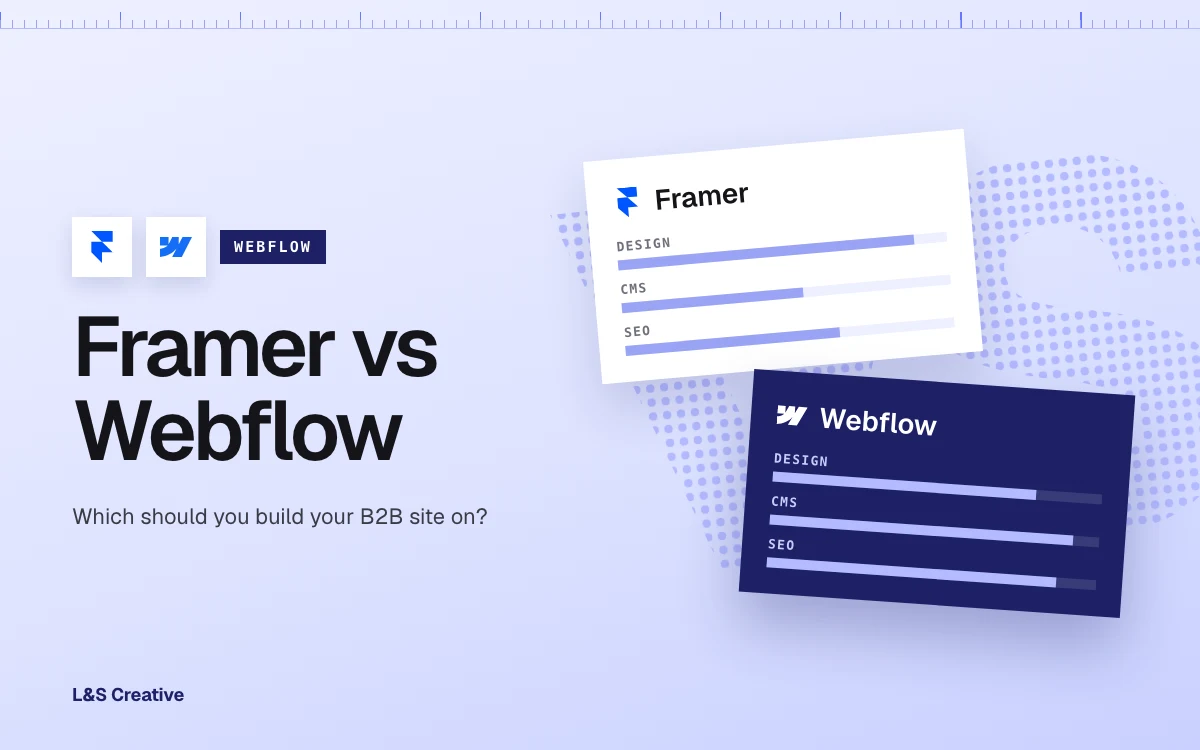
- Framer wins on design speed and price of entry. Its free plan is genuinely usable and its Basic tier is $10/mo. If you are a solo designer or a small team shipping a marketing site fast, Framer gets you there quicker and cheaper.
- Webflow wins on CMS scale. Webflow's $25/mo Premium plan ships with 20,000 CMS items and 40 Collections built in. Framer matches that item ceiling only on Pro with paid add-ons. If you plan to run a real blog, resource library, or programmatic content, that headroom matters.
- Both platforms can rank. Neither Framer nor Webflow is the reason your site does or doesn't rank. Execution is. But Webflow's SEO controls are more mature out of the box; Framer needs custom code for the things Webflow gives you natively.
- Framer's redirects are a paid feature. 301 redirects, which every growing site eventually needs, sit behind Framer's paid tiers. Webflow includes them on every plan.
- Pricing crosses over as you scale. Framer is cheaper at the very small end (free tier, then $10/mo Basic). Once you need real CMS capacity, more editor seats, or advanced SEO, Webflow's $25/mo Premium plan bundles more in and the gap narrows or flips.
- Neither platform is "wrong." A five-page product launch site and a 40-page B2B SaaS marketing site with a blog are different problems. Match the platform to the problem, not the hype cycle.
Framer or Webflow. If you are picking a platform for a B2B marketing site, that is the real shortlist in 2026.
Short answer: Framer is the faster, cheaper way to ship a beautiful, animation-heavy site fast. Webflow is the better foundation once that site needs to scale content, rank in search, and support a marketing team past the first six months.
We are a Webflow agency. So take that bias as read. But we are not here to strawman Framer, because it does not deserve it. Framer has gotten genuinely good. This is the honest 2026 comparison: where each one wins, where each one will bite you later, and how to pick without guessing.
Framer vs Webflow at a glance
Skip the 40-row feature checklist. Here is what actually changes your decision:
- Design freedom. Framer: built for motion and interaction first, very fast to prototype. Webflow: full pixel-level control plus a real box model, built for structured, content-heavy sites as much as for motion.
- CMS and content scale. Framer: 2 CMS collections on Basic ($10/mo), 10 on Pro ($30/mo) expandable to 40 via paid add-ons ($40 per 10). Webflow: the $25/mo Premium plan ships with 40 Collections and 20,000 CMS items built in, no add-on shopping.
- SEO controls. Framer: auto-generated sitemap.xml and robots.txt, but 301 redirects require a paid plan and schema/JSON-LD guidance points to manual custom code. Webflow: automatic sitemaps, native canonical tags, and 301 redirects on every plan, no plugin or custom code required.
- Performance. Both platforms are modern, hosted, and CDN-backed. Neither one hands you good Core Web Vitals by default. On our own migrations we've launched Webflow builds at an 86.3% performance score with desktop LCP under a second; the platform gets you most of the way, but image weight and embed bloat are still on you either way.
- Learning curve. Framer: closer to a design tool, faster for a solo designer to pick up. Webflow: steeper up front (real class-based styling, CMS structure to plan), but that structure is what lets a marketing team hand off pages without breaking the build.
- Pricing. Framer: free tier, then $10/mo Basic and $30/mo Pro, with editor seats at +$20/mo each. Webflow: free Starter, $15/mo Basic, $25/mo Premium (yearly). Framer is the cheaper entry point for a small site; Webflow's Premium plan becomes the better value once you need CMS scale and SEO features that would otherwise need Framer add-ons or custom code.
- Best-fit use case. Framer: portfolios, product launch pages, small marketing sites, design-led one-pagers. Webflow: B2B and SaaS marketing sites that need a blog, resource hub, or CMS-driven pages at scale, and need to rank.
Design freedom: both are genuinely good here
Let's kill the myth first. Framer is not a "toy" and Webflow is not "just for developers." Both are visual, no-code builders that get you to a polished, custom design without a developer writing HTML from scratch.
Framer's edge is motion. It was built by a team obsessed with interaction and animation, and it shows. If your site leans heavily on scroll effects, micro-interactions, and a portfolio-style feel, Framer gets you there with less fuss.
Webflow's edge is structure. You get the same visual, no-code canvas, but underneath it is a real box model and a class system built for pages that need to repeat: blog posts, case studies, product pages, resource libraries. That structure is invisible on a 5-page site. It is the entire game on a 50-page one. Our own Webflow design services exist because most B2B teams want that structure without hiring an engineer to enforce it.
So on pure design freedom: close call, slight edge to Framer for motion-led, small sites. Slight edge to Webflow the moment the site needs to hold a lot of content without falling apart.
CMS: where the gap opens up
This is the section that matters most if you are a B2B or SaaS marketing team, and it's the one most "Framer vs Webflow" posts skip.
Framer's CMS has improved a lot. It is a real collection-based CMS now, not an afterthought. But it is still gated by plan. Basic ($10/mo) gives you 2 collections. Pro ($30/mo) gives you 10, expandable to 40 through paid add-ons at $40 per extra 10 (framer.com/pricing). That is fine for a handful of content types. It gets expensive and fiddly fast if you are running a blog, a resource library, a customer story hub, and a glossary at the same time.
Webflow's Premium plan (the merged CMS + Business tier Webflow shipped in May 2026) ships with 40 Collections and 20,000 CMS items built into the $25/mo base price, no add-on shopping required (webflow.com/pricing). For a marketing team publishing weekly, that ceiling is the difference between planning content freely and rationing it.
One honest wrinkle on the item ceiling: Framer's pricing page caps Pro at 40,000 CMS items with add-ons, but Framer's CMS product page separately advertises "up to 100K items" without tying that figure to a plan. Those two Framer pages disagree, so we are not going to quote a single hard cap for Framer here. Check the tier you actually plan to buy before you count on a number.
The honest caveat: if you only need one or two content types (a simple blog, a simple case-study list), Framer's CMS is genuinely fine. You do not need Webflow's headroom you are not going to use. This only tips toward Webflow once your content plan gets ambitious.
SEO: both can rank, the controls aren't equal
Neither platform is the reason your site does or doesn't rank in Google. Content, links, and authority still do the heavy lifting on any platform. We go deep on that argument in our Webflow SEO guide.
But the controls you get out of the box are not equal, and this is where a lot of Framer-vs-Webflow content gets vague. Framer auto-generates a sitemap.xml and gives you robots.txt controls, which covers the basics. And 301 redirects, which any site with a URL that changes eventually needs, are locked behind Framer's paid plans (Framer's SEO help docs).
Schema is where Framer's own documentation gets muddy, so here is the honest version. Framer's CMS product page advertises "automatic schema and open graph tags," but Framer's own SEO help article walks you through adding JSON-LD structured data manually via the custom code panel. Those two claims contradict each other. Our read: do not assume Framer generates the schema you actually need (FAQPage, Article, Organization) automatically. Plan to add it by hand and treat any auto-generation as a bonus, not a given.
Webflow gives you automatic sitemaps, native canonical tags, and 301 redirects on every plan with no plugin (webflow.com/pricing), and its CMS Collection templates let you set an SEO pattern once and have it apply to every item automatically. It still does not write your JSON-LD schema for you either, to be fair. But the baseline is more complete before you touch a line of code.
If ranking risk during a platform switch is the actual worry (not the platform-choice decision itself), we covered that separately in WordPress vs Webflow SEO: will your rankings drop when you switch? The mechanics there (redirects, canonical handling, content parity) apply to any platform move, not just WordPress.
Performance: closer than either camp likes to admit
Both Framer and Webflow are modern, hosted platforms with CDN delivery. Neither one is going to hand you a slow site by default, and neither one is going to hand you a fast one either. Performance on both platforms comes down mostly to build discipline: image optimization, how many embeds and third-party scripts you stack on a page, and how much animation you ask the browser to do at once.
We can only speak with real numbers for our own side. Our Transfrinc migration (250+ pages, WordPress to Webflow) launched at an 86.3% performance score with desktop LCP under one second. That is a Webflow build done carefully, not a platform guarantee. A sloppy Webflow build and a sloppy Framer build will both fail Core Web Vitals in their own way.
Learning curve: who is actually going to build and maintain this
Framer feels closer to a design tool. If you have used Figma, Framer's canvas will feel familiar fast, and that familiarity is real value for a solo designer or a very small team without a dedicated web person.
Webflow asks more of you up front. You are working with real classes, a real box model, and a CMS structure you have to plan before you build. That is a steeper first week. It is also exactly what lets a marketing team hand pages to different writers and editors later without one wrong click breaking the layout. If you have ever weighed hiring it out entirely, we wrote about when that trade makes sense in Webflow agency vs freelancer.
Neither learning curve is a dealbreaker. The honest read: if one person owns the whole site and it stays small, Framer's curve is friendlier. If a team is going to touch this site for years, Webflow's curve pays for itself.
Pricing: the crossover point
At the smallest end, Framer is cheaper. It has a genuinely usable free tier, and Basic is $10/mo with 2 CMS collections. That is a legitimate way to launch something small without spending much. Webflow's paid plans start at $15/mo Basic, with the CMS-capable Premium plan at $25/mo billed yearly (webflow.com/pricing).
The crossover happens when your needs grow. Framer Pro is $30/mo, and scaling past its 10 base collections means add-ons at $40 per extra 10 collections, plus $20/mo per editor seat (framer.com/pricing). Add redirects, because you inevitably will, and you need a paid Framer plan to get them at all. Webflow's Premium plan bundles 40 Collections, 20,000 CMS items, native redirects, and the rest of its SEO controls into that one $25/mo price, so the "keep adding paid extras" problem does not show up the same way.
Bottom line on cost: for a small, simple, mostly-static site, Framer is the cheaper build. For a B2B or SaaS marketing site that plans to publish regularly and scale its content, Webflow's all-in-one Premium plan tends to work out more predictable, not less.
Best-fit use cases
- Pick Framer if: you are a solo designer or very small team, the site is mostly static or has light CMS needs, motion and interaction are central to the brand, and you want the fastest path from Figma-brain to a live site.
- Pick Webflow if: you are a B2B or SaaS marketing team that needs a blog, resource hub, or case-study library to grow over time, more than one or two people will edit the site, SEO at scale matters, and you want the CMS ceiling to be a non-issue two years from now.
So, which should you pick?
If you are shipping a five-page launch site with heavy motion and one person maintaining it: Framer is the right call. Do not let anyone talk you out of the cheaper, faster option when the job is actually small.
If you are a B2B or SaaS marketing leader building the site that has to carry your content strategy, your SEO, and a growing team of contributors for the next few years: that is our ICP, and that is where Webflow earns its reputation. The CMS ceiling, the native SEO controls, and the structure built for scale are exactly the things a small site does not need and a growing one cannot do without.
We build the second kind of site for a living. If that is the decision in front of you, book a discovery call and we will walk through what your specific content plan needs.
Limits and how we plan around them
We are a Webflow agency, so we are not a neutral source, and you should read this with that in mind. We have not shipped a production Framer site ourselves, so our Framer read comes from its own documentation and independent public sources, not first-party build experience the way our Webflow claims are.
We also do not offer Framer-to-Webflow migrations as a service. If you are already deep on Framer and happy there, that is a good outcome too. This piece is for the decision before you have built anything yet.
FAQ
- Is Framer or Webflow better for SEO? Both can rank well. Content and links still do the heavy lifting. Webflow ships more SEO controls natively (sitemaps, canonical tags, redirects on every plan); Framer covers the basics but needs custom code for schema and a paid plan for redirects.
- Is Framer cheaper than Webflow? At the smallest end, yes. Framer has a free tier and a $10/mo Basic plan; Webflow's paid plans start at $15/mo. Once you need more CMS collections, redirects, or advanced SEO, the gap narrows because Framer adds cost per feature ($40 per 10 extra collections, $20/mo per editor) while Webflow's $25/mo Premium plan bundles 40 Collections and 20,000 items in from the start.
- Can you run a blog on Framer? Yes, Framer's CMS supports a blog. The limit is scale: entry and mid tiers cap the number of CMS collections, so a single blog is fine but running several content types together gets tight faster than on Webflow.
- Is Framer good enough for a B2B SaaS marketing site? For a small site or a single landing page, yes. For a marketing site that needs to scale content, support multiple editors, and rank at volume, Webflow's CMS ceiling and native SEO controls are built for that job specifically.
- Do you need to know how to code to use Framer or Webflow? No, both are visual, no-code builders. Framer feels closer to a design tool like Figma. Webflow has a steeper first week because you are working with real classes and CMS structure, but neither requires writing code for a standard site.